

ABOUT PANINI BRIDGE
Panini Bridge is a secure system that allows collectors to seamlessly move their Panini NFTs between the Panini Blockchain and public blockchains like Ethereum
Contact Customer Support
- What's Available at Launch?
- New to Crypto? Start Here: Key Terms Explained
- About Panini Bridge
- Wallets and Connections
- Transferring NFTs to Ethereum
- Returning NFTs to Panini
- Common Questions
- Quick Reference: Limits and Key Facts
This section answers the most common questions about what is supported right now. As Panini Bridge grows, additional collections, wallets, and marketplaces will be added. Check back for updates.
Q Which NFT collections can be bridged to Ethereum?
At launch, the following Panini NFT collections are available for transfer through Panini Bridge:
Bad Egg Collections
2025 Panini NFT Prizm Bad Eggs
2025 Panini NFT Prizm Bad Eggs: Introducing The Clans
More collections coming Select Panini NFT collections will be made available for bridging over time. |
Q Which public marketplaces are supported?
Panini has partnered exclusively with OpenSea as the official marketplace for Panini NFTs. Once your NFTs are transferred to the Ethereum blockchain, you can list, sell, and showcase them directly on OpenSea.
OpenSea: Panini's Exclusive Marketplace Partner OpenSea is the world's largest NFT marketplace and Panini's official launch partner. Only trade or purchase Panini NFTs through OpenSea to ensure you are transacting on a verified, Panini approved platform. |
Q Which wallets are supported?
The following wallet options are supported at launch:
MetaMask: one of the most widely used Ethereum wallets. Available as a browser extension and mobile app.
Coinbase Wallet: the self custody wallet from Coinbase, available on web and mobile.
Connections throughWalletConnect: WalletConnect is a connector protocol (not a wallet itself) that supports over 100+ different wallet types. If your preferred wallet is not MetaMask or Coinbase Wallet, check if it is compatible through WalletConnect.
Not sure which wallet to use? If you are new to Web3, MetaMask is the most commonly-used starting point and has detailed setup guides available at Setup Guide |
Q Which blockchains are supported?
Panini Bridge supports transfers to and from the Ethereum blockchain only. Ethereum is the world's most widely used public blockchain and is the standard for NFT transacting on platforms like OpenSea.
Q Where is my NFT's metadata stored once it is bridged?
When your NFT is transferred to Ethereum, its metadata and artwork are permanently stored on Arweave: a decentralized, permanent storage network. This means your NFT's image and details can never be lost, altered, or deleted by anyone, including Panini.
While your NFT remains on the Panini Blockchain, its metadata is managed securely by Panini on their platform.
Panini's custom view on OpenSea |
Q Can I use Panini Bridge on the mobile app?
No. The Panini Direct mobile app is view only for Panini Bridge.
You can view your NFTs and collections in the app.
You cannot initiate transfers, connect wallets, or manage the Withdrawal Pool from the mobile app.
Use a web browser for all transfers All wallet connections and NFT transfers must be done through a web browser at nft.paniniamerica.net. A desktop browser is recommended for the best experience. |
If you are new to digital wallets and blockchain technology, this quick glossary will help you understand the terms used throughout this guide.
Terminology | Description |
NFT | A Non-Fungible Token: a unique digital collectible recorded on a blockchain. Your Panini digital trading cards are NFTs. |
Blockchain | A secure, shared digital ledger that permanently records who owns what. Panini runs its own blockchain, and Ethereum is a major public blockchain. |
Wallet (Web3) | A digital app that stores your NFTs and crypto on a public blockchain. Think of it as a safety deposit box only you can open. Examples: MetaMask, Coinbase Wallet. |
Private Key | A secret code that proves you own a wallet, similar to a master password. Never share this with anyone. Whoever holds your private key controls your wallet and everything in it. |
Seed Phrase | A set of 12 to 24 words generated when you create a wallet. Your seed phrase is a backup that can restore full access to your wallet. Store it offline and never share it with anyone. |
Gas Fee | A small transaction fee paid in ETH (Ethereum's currency) to process actions on the Ethereum blockchain. Fees vary based on network activity. |
Minting | The process of officially creating your NFT on the Ethereum blockchain so it becomes publicly verifiable and tradeable on platforms like OpenSea. |
Escrow | A temporary holding account. When you begin a transfer, Panini holds your NFT in escrow to keep it secure during the process. It cannot be sold or traded while in escrow. |
Metadata | The descriptive information attached to your NFT, including the card image, player name, card type, serial number, and other details that make each NFT uniquely identifiable. |
Arweave | A decentralized permanent storage network. When your NFT is minted on Ethereum, its metadata and artwork are stored on Arweave so they can never be lost or altered. |
WalletConnect | A connection protocol (not a wallet itself) that lets you link over 100+ different types of wallets to Panini Bridge. If your wallet is not MetaMask or Coinbase, use WalletConnect. |
OpenSea | The exclusive external marketplace partner at launch, where you can list, buy, and sell your Panini NFTs after they have been transferred to Ethereum. |
Contract Address | A unique identifier for an NFT collection on the Ethereum blockchain, similar to a barcode that identifies an official Panini collection. |
Etherscan | A public website where you can view all transactions recorded on the Ethereum blockchain. Use it to verify your transfers independently. |
Q What is Panini Bridge?
Panini Bridge is a secure system that lets you move your Panini NFTs between two different blockchains:
The Panini Blockchain: Panini's own secure platform where your digital cards normally live.
The Ethereum Blockchain: the world's most widely used public blockchain, where NFTs can be traded on platforms like OpenSea.
Think of it as a secure transfer service. Your NFT is safely locked on one side before it appears on the other, so there is never a risk of duplication.
Q Why was Panini Bridge created?
Panini Bridge gives collectors true ownership flexibility. You can keep enjoying your cards within the Panini platform, playing Challenges, completing Crafts, and trading on the Panini Marketplace, or move them to the open Web3 world to sell on OpenSea and showcase across public platforms. The choice is always yours.
Q What can I do with Panini Bridge?
Connect a Web3 wallet (MetaMask, Coinbase Wallet, or connections through WalletConnect).
Transfer Panini NFTs from the Panini Blockchain to Ethereum (called minting).
Deposit NFTs from Ethereum back to your Panini collection at any time.
View and manage your connected wallets.
Track your full transfer history and transaction status.
Access integrated Web3 marketplaces (currently OpenSea only) to list and trade your NFTs after transfer.
Q Is Panini Bridge safe to use?
Yes. Panini Bridge is a secure, centralized system managed directly by Panini. All transfers pass through Panini Escrow: a controlled holding account that ensures your NFT is properly locked, verified, and transferred between blockchains without any risk of duplication or loss.
Q Do I need a Web3 wallet to use Panini Bridge?
Yes. To move NFTs from the Panini Blockchain to Ethereum, you need a Web3 wallet. Your wallet acts as your personal storage space for NFTs once they are minted on the public blockchain. Only you have access to it.
Supported wallets at launch: MetaMask Coinbase Wallet Connections through WalletConnect: WalletConnect is a connector protocol, not a wallet itself. It supports over 100+ wallet types. If your preferred wallet is not MetaMask or Coinbase, check if it is compatible through WalletConnect. |
Keep your wallet credentials safe Your private key and seed phrase are the only ways to recover access to your wallet. Never share them with anyone, including Panini support. Panini will never ask for your private key or seed phrase. |
Helpful setup guides: MetaMask: Setup Guide Coinbase Wallet : Web setup Guide Mobile Setup Guide |
Q How do I connect my Web3 wallet to my Panini account?
Web browser required Wallet connection is only available through a web browser at nft.paniniamerica.net. This feature is not available within the Panini Direct mobile app. |
1. Go to nft.paniniamerica.net and log in with your Panini credentials.
2. Click the Web3 Connect button (next to the wallet icon).

3. Accept the Terms and Conditions (first time only).
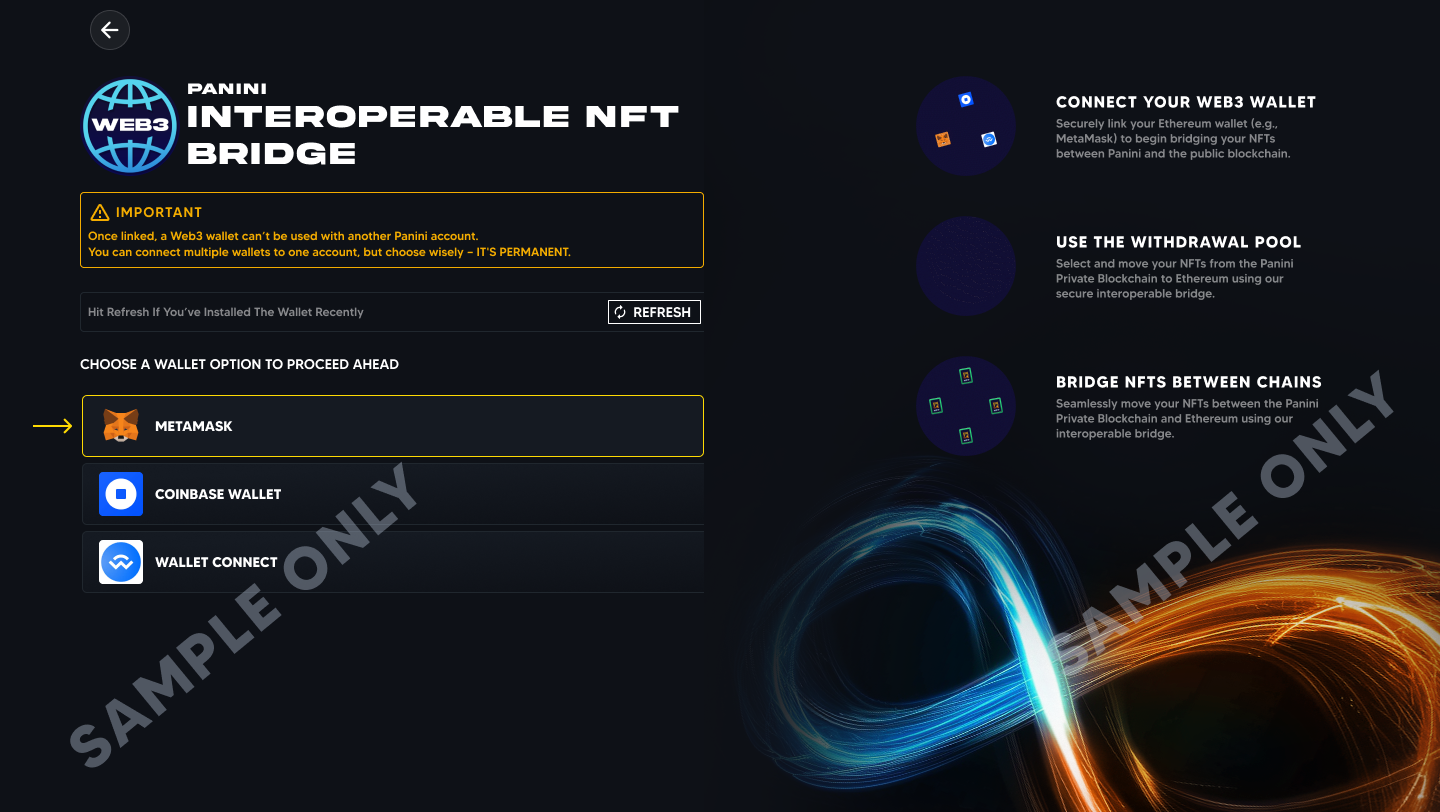
4. You will be taken to the wallet selection page. Choose your wallet, for example MetaMask.

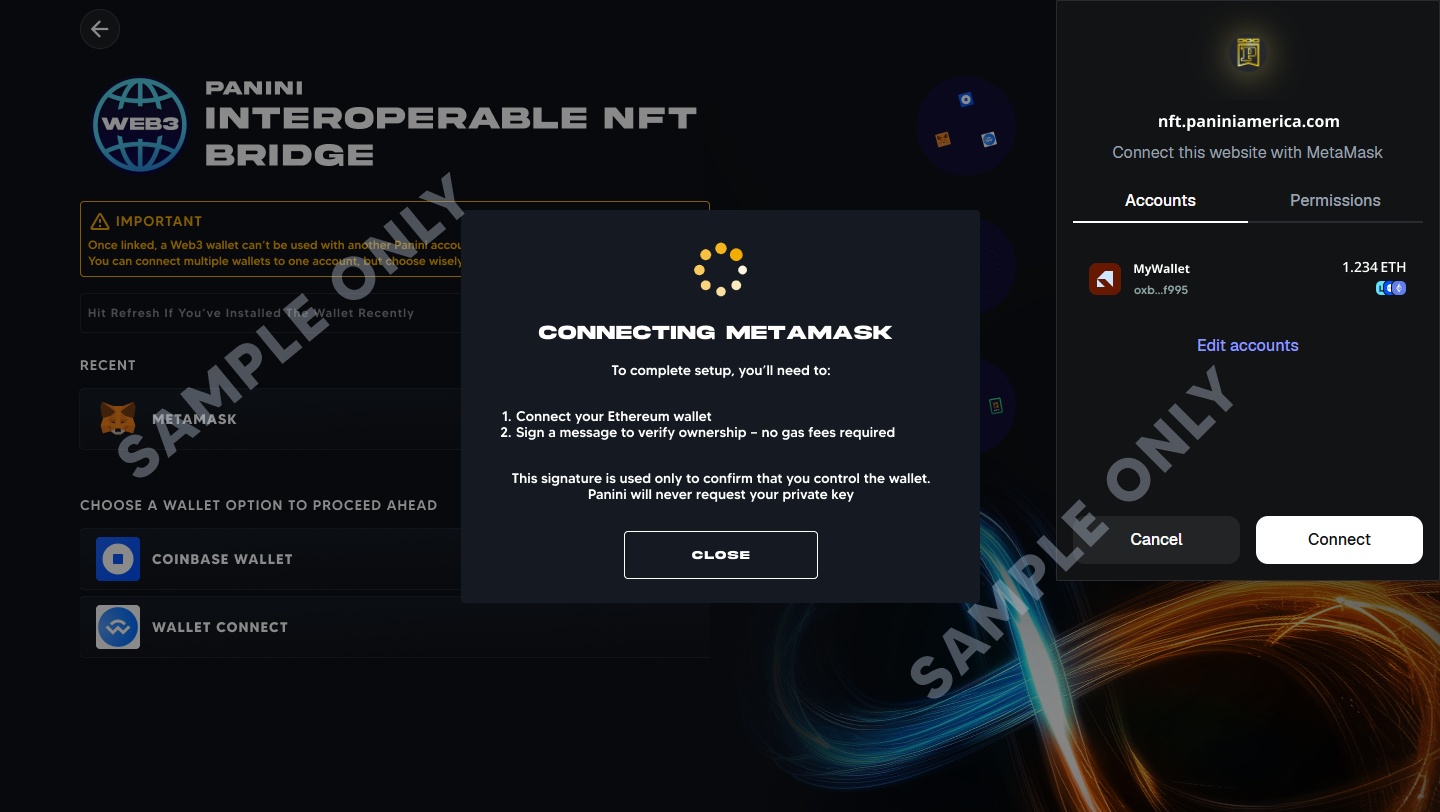
5. A pop up will appear from your wallet asking you to connect. Review and click Connect.

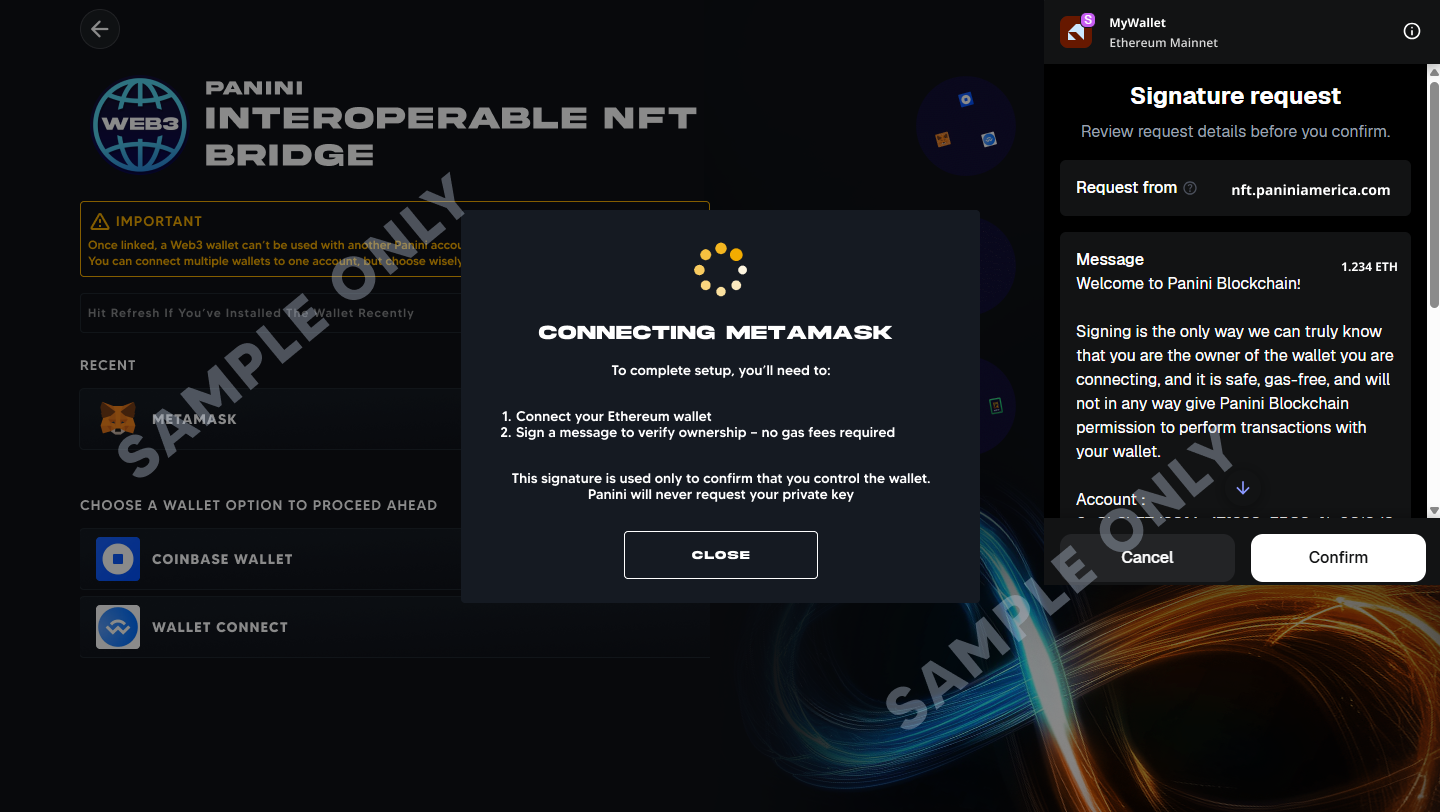
6. Your wallet will then show a Signature Request. Review and click Confirm.
7. Once confirmed, your wallet is connected to your Panini account. Your wallet address will appear next to the wallet icon on the homepage.


Notes about wallet connections:
Multiple wallets: You can connect more than one wallet to your Panini account. Each wallet must be unique and cannot be linked to another Panini account.
Disconnect anytime: You can disconnect and reconnect wallets at any time through Web3 Connect.
Permissions are device specific: Wallet permissions do not carry over across browsers or devices. If you log in on a different device, you will need to reconnect and reapprove your wallet. This is a security feature.
Q Do wallet permissions carry over to other devices or browsers?
No. Wallet permissions are local to the browser and device where they were originally approved. Even if you log in to the same Panini account on another device, you will need to reconnect your wallet and approve the connection again. This extra step protects your security by ensuring every new connection is explicitly authorized inside the wallet.
Q How do I transfer my NFTs to the Ethereum blockchain?
Transferring (or minting) your Panini NFTs to Ethereum is a two-stage process.
Overview: Two-Stage Transfer Process Stage 1: Add NFTs to the Withdrawal Pool. Your NFTs are locked in Panini Escrow while they are prepared for the public blockchain. Stage 2: Transfer to Ethereum. You pay a gas fee (an Ethereum network fee) and your NFTs are officially minted on the public blockchain. |
Stage 1: Add NFTs to the Withdrawal Pool
The Withdrawal Pool is a temporary holding area, similar to a shopping cart, for NFTs you are preparing to send to Ethereum. Once an NFT is added:
It is locked in Panini Escrow and removed from your active collection.
It cannot be sold, gifted, or used in Challenges or Crafts while locked.
You will not receive new offers on it while it is in the pool.
How to add NFTs to the Withdrawal Pool?
Option A: Through Collections
1. Go to Profile > Collection.
2. Click the Web3 dropdown and select Add NFTs to Withdrawal Pool.
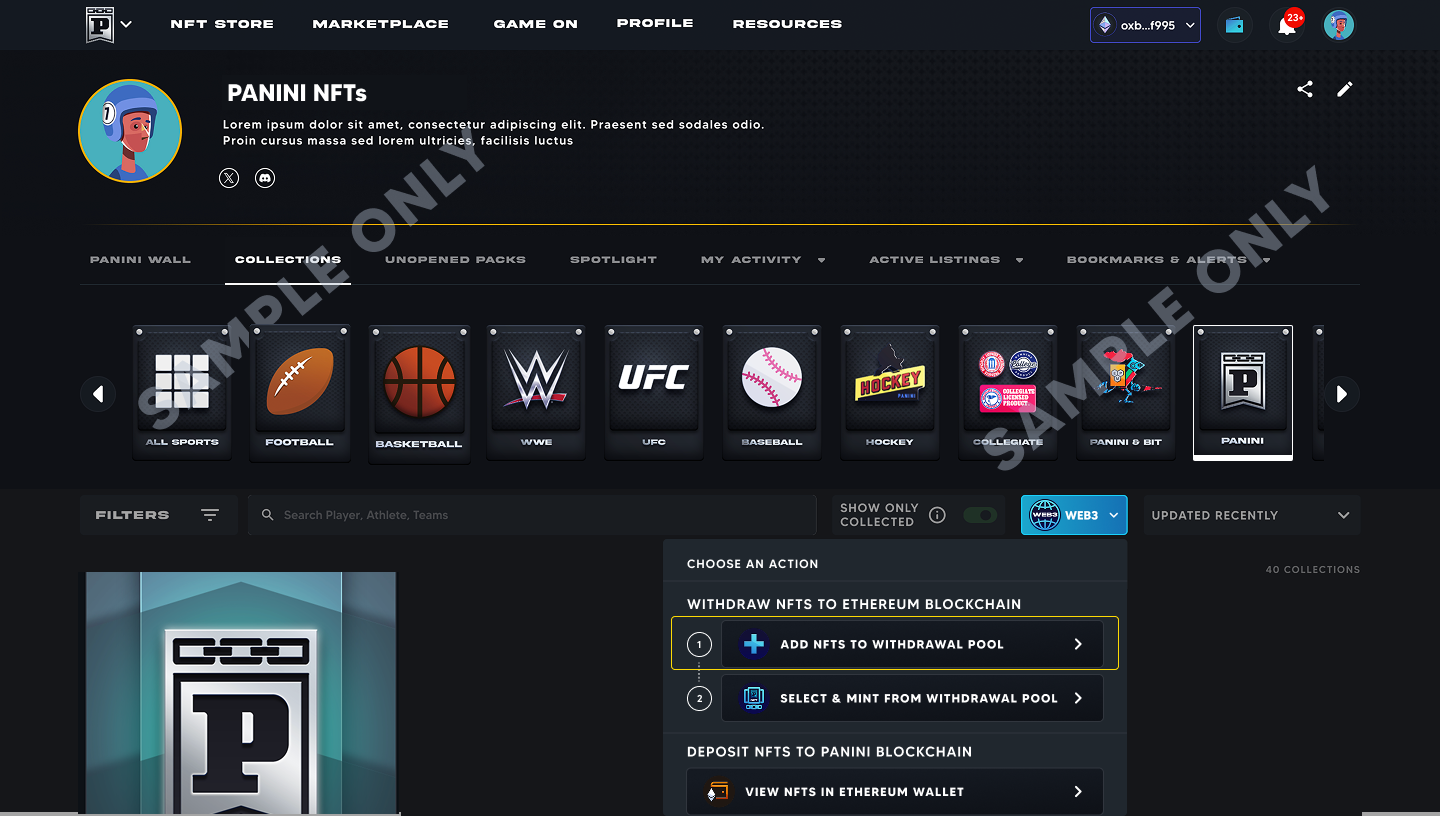
3. Connect your Web3 wallet if prompted.
Option B: Through Panini Bridge
1. Click the dropdown arrow next to the Web3 Connect button.
2. Navigate to Withdrawal Pool and select Add NFTs to Withdrawal Pool.
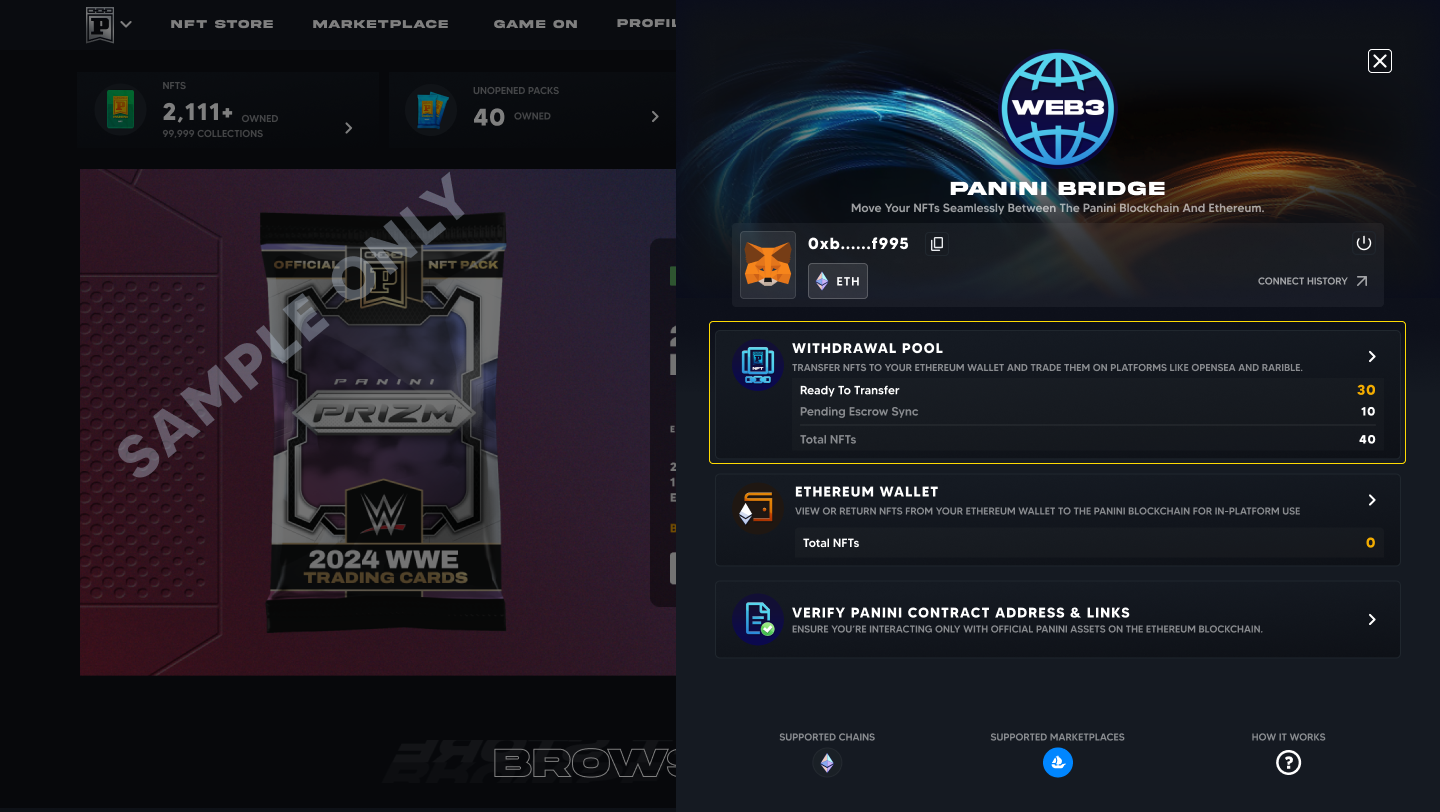
Selecting NFTs:
NFTs are grouped by sport. Use filters to find specific cards.
Select the NFTs you want and click Add to Withdrawal Pool.
Any card showing a Not Mintable status is restricted and cannot be transferred to Ethereum.
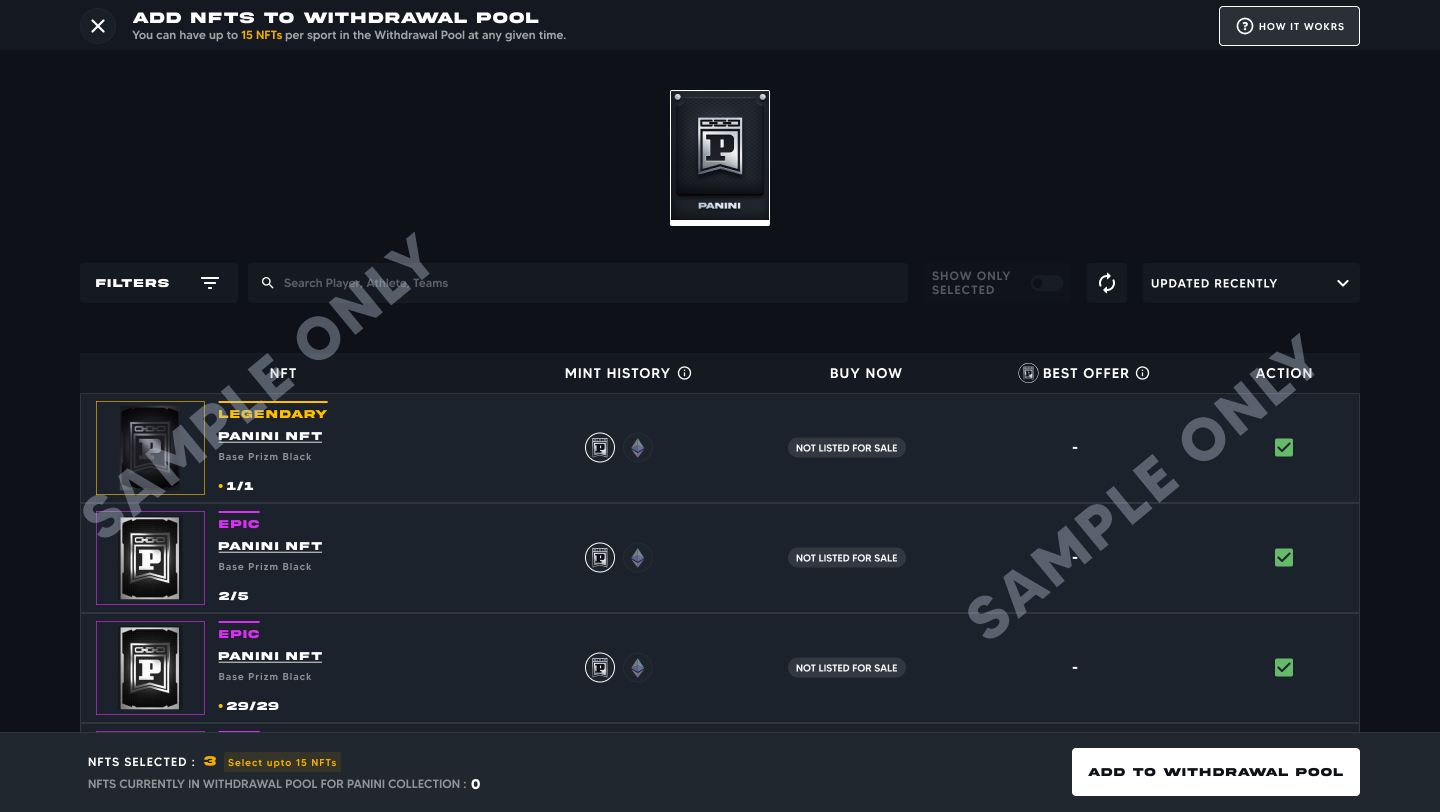
Review your selection in the confirmation screen, then click Initiate Transfer.
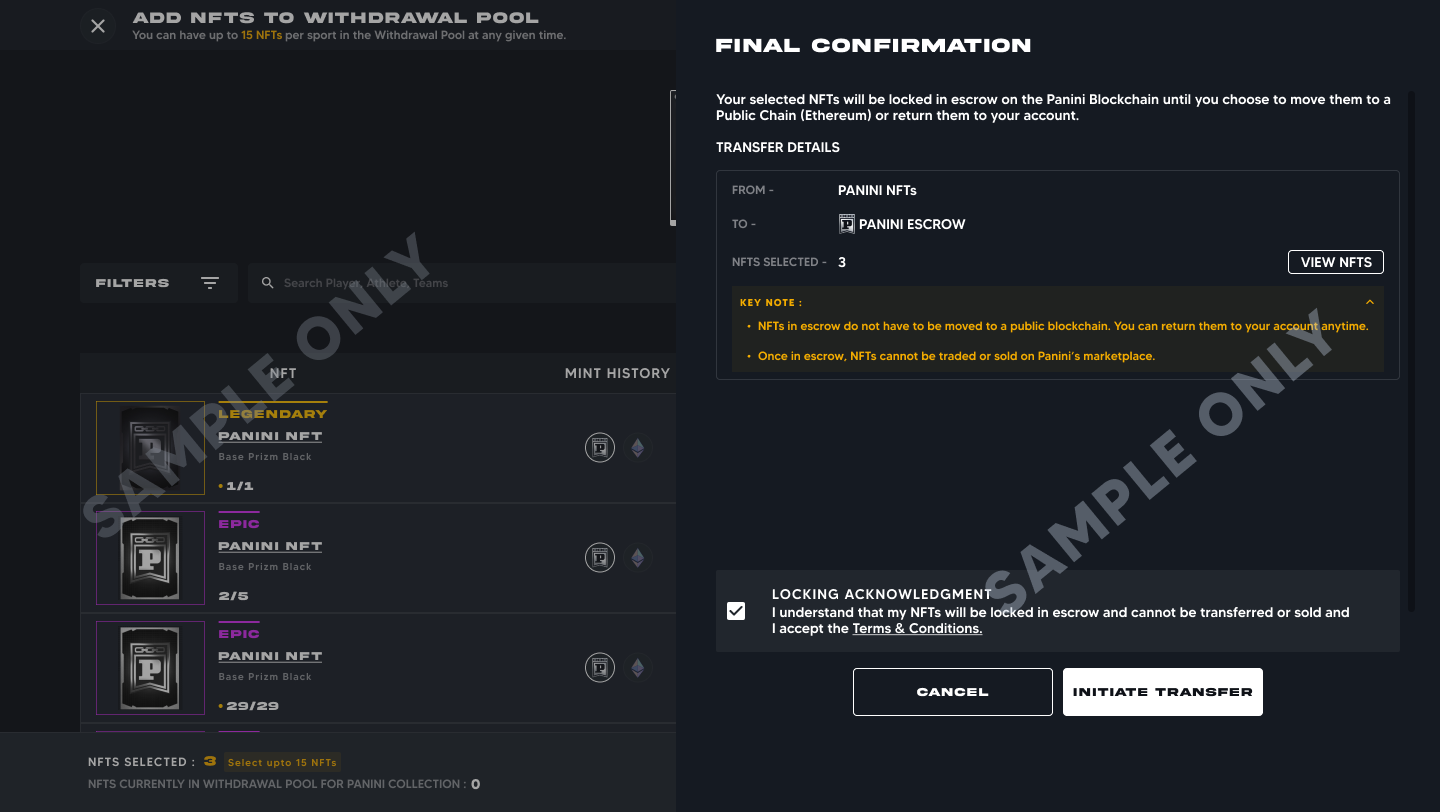
About the Pending Escrow Sync status: Please Read This After adding NFTs to the Withdrawal Pool, they will show as Pending Escrow Sync. This can take up to 2 hours. Why so long? During this time, Panini is preparing your NFT for the public blockchain. This includes uploading the card image, player data, serial number, and all other details (the metadata) to Arweave, a permanent decentralized storage network. Once stored there, your NFT's information can never be altered or deleted. While an NFT is in Pending Escrow Sync, you cannot remove it from the pool or mint it to Ethereum. You must wait for it to move to Ready to Transfer before taking any further action. Important: This 2 hour process only happens the FIRST TIME an NFT is prepared for transfer. If you bring an NFT back to Panini and bridge it to Ethereum again in the future, this step is skipped and will process significantly faster. Once all checks pass, your NFT moves to the Ready to Transfer tab. |
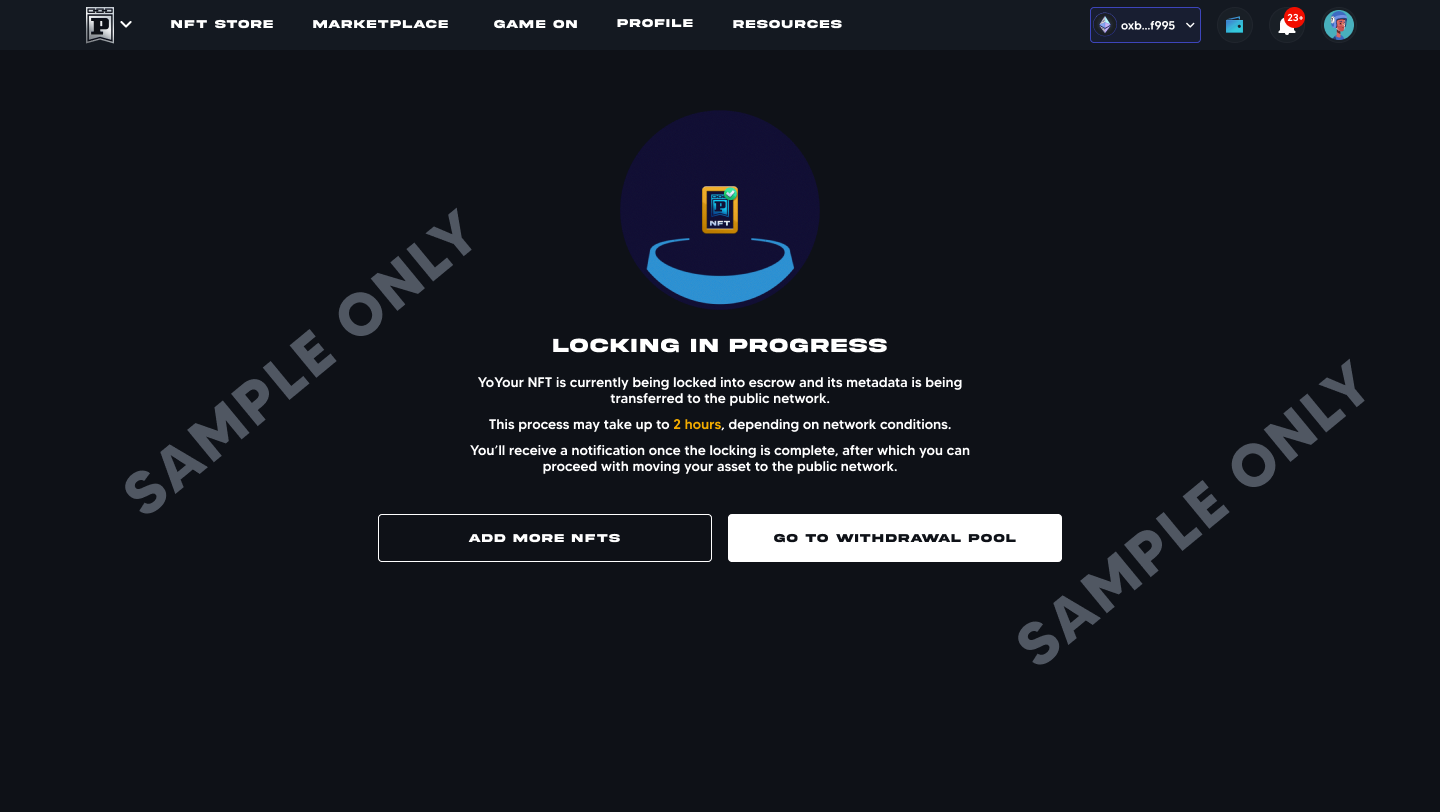
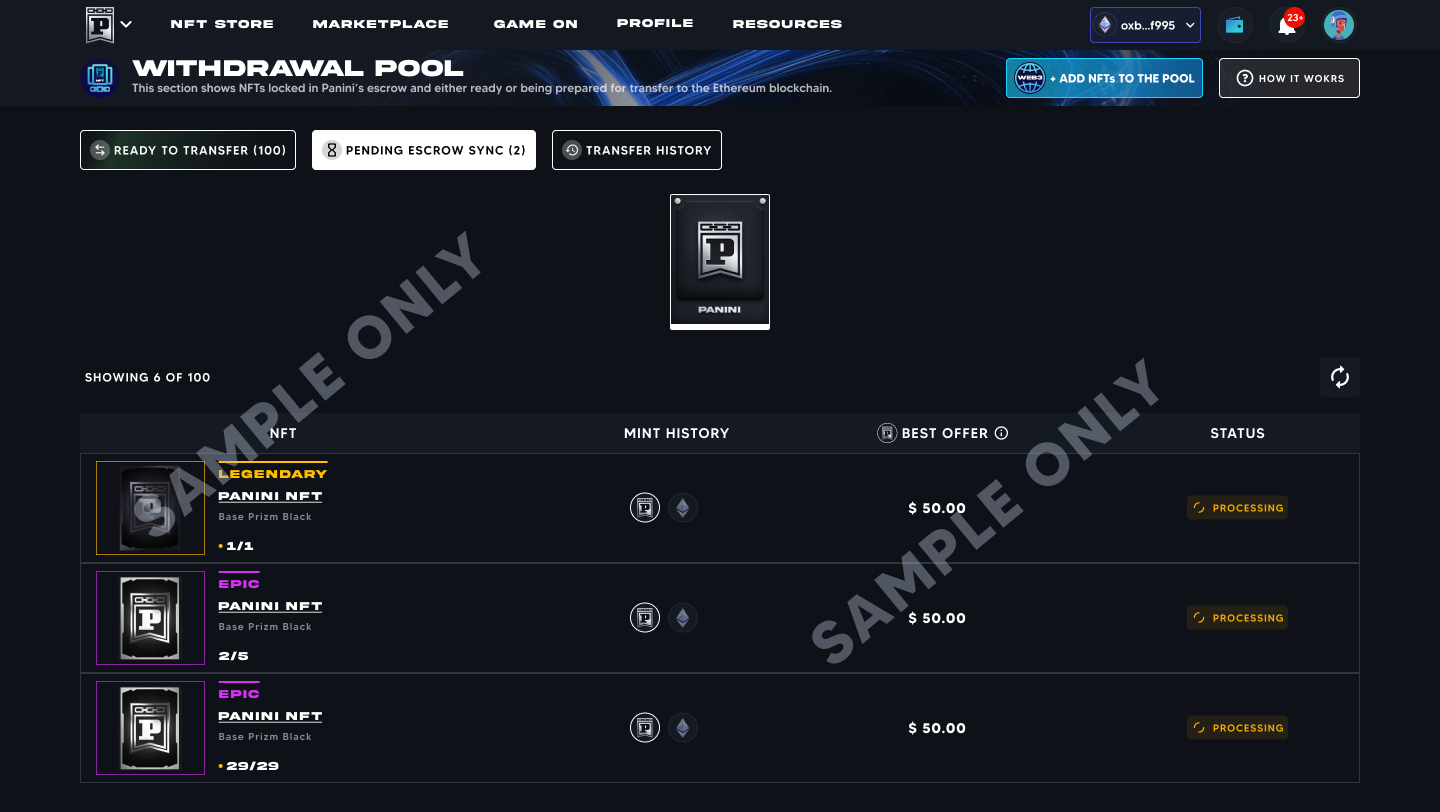
You will be notified when the Escrow Sync is completed You will receive a notification once your NFTs have been successfully synced to Panini Escrow |
Withdrawal Pool limits at launch: with examples Per sport pool limit: A maximum of 15 NFTs per sport can be in the Withdrawal Pool at any given time. Per transaction limit: A maximum of 5 NFTs can be transferred to Ethereum per transaction. |
Stage 2: Transfer to Ethereum (Minting)
Once your NFTs appear under Ready to Transfer, follow these steps:
1. Make sure your Web3 wallet is connected and has enough ETH to cover the gas fee.
2. Go to Withdrawal Pool > Ready to Transfer.
3. Select up to 5 NFTs and click Move to Ethereum Blockchain.
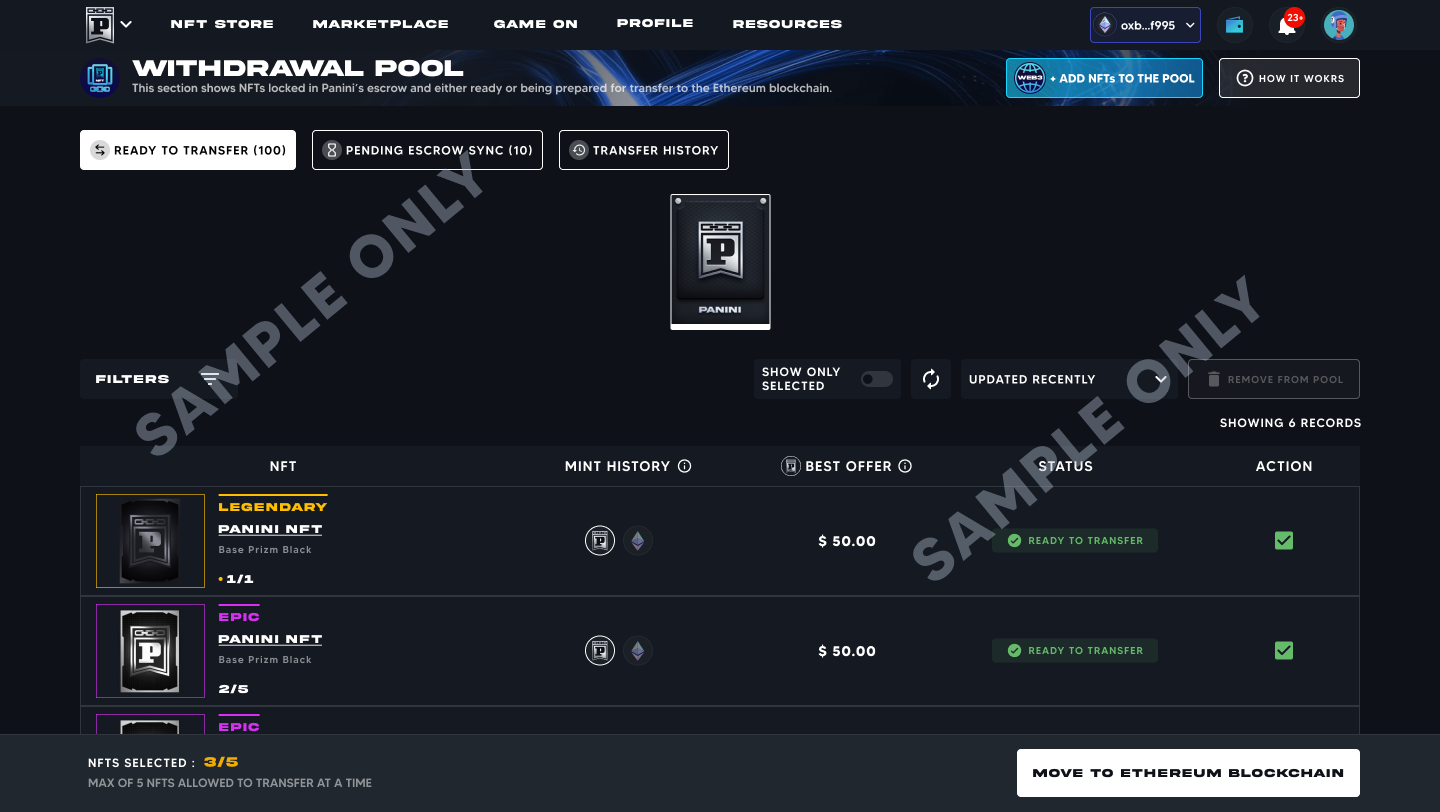
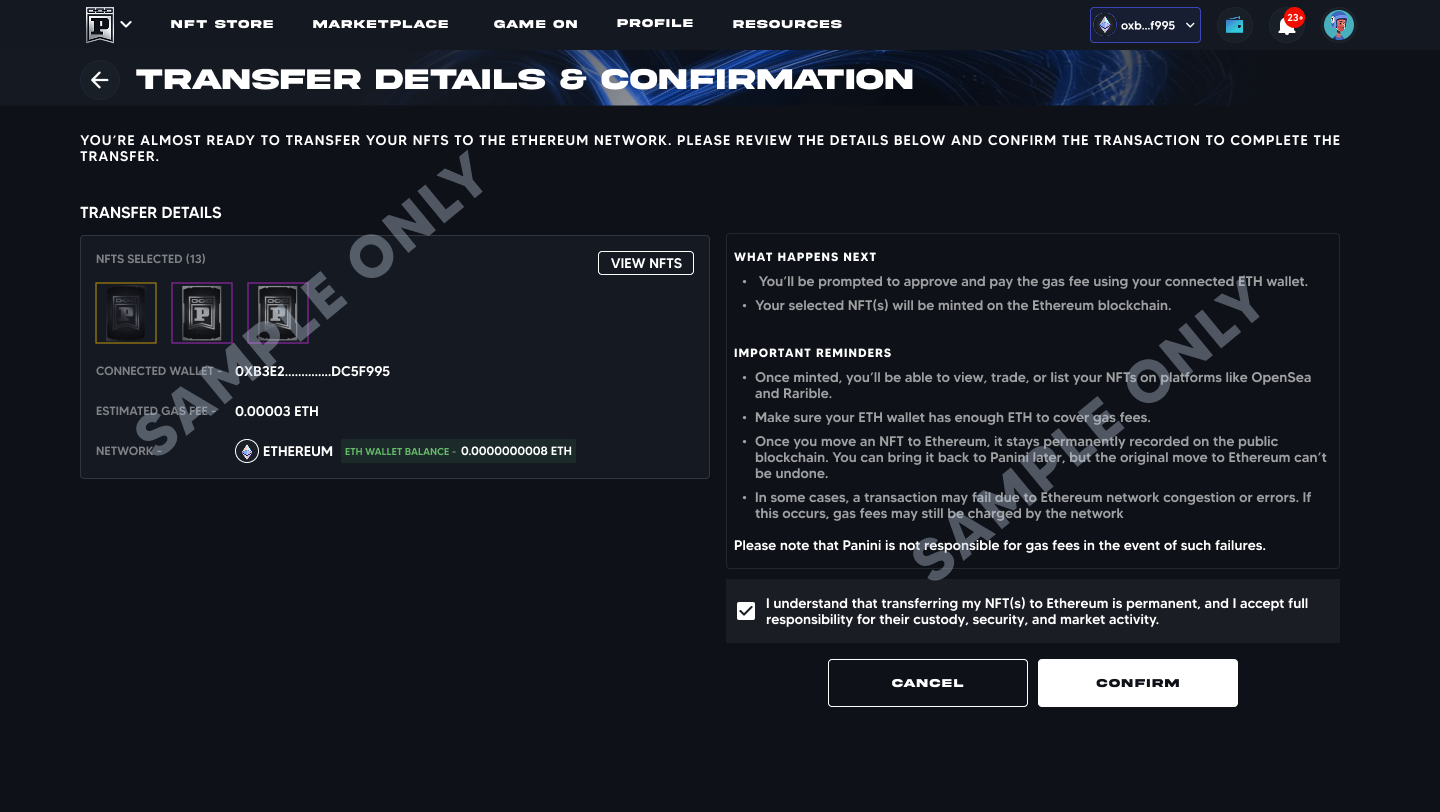
4. Review the transfer details: your wallet address, estimated gas fee, and network (Ethereum).
5. Accept the terms and click Confirm.
6. Enter the OTP (one time password) sent to your registered email. This is only required once per 1 hour session.
7. Approve the transaction in the wallet pop up that appears.
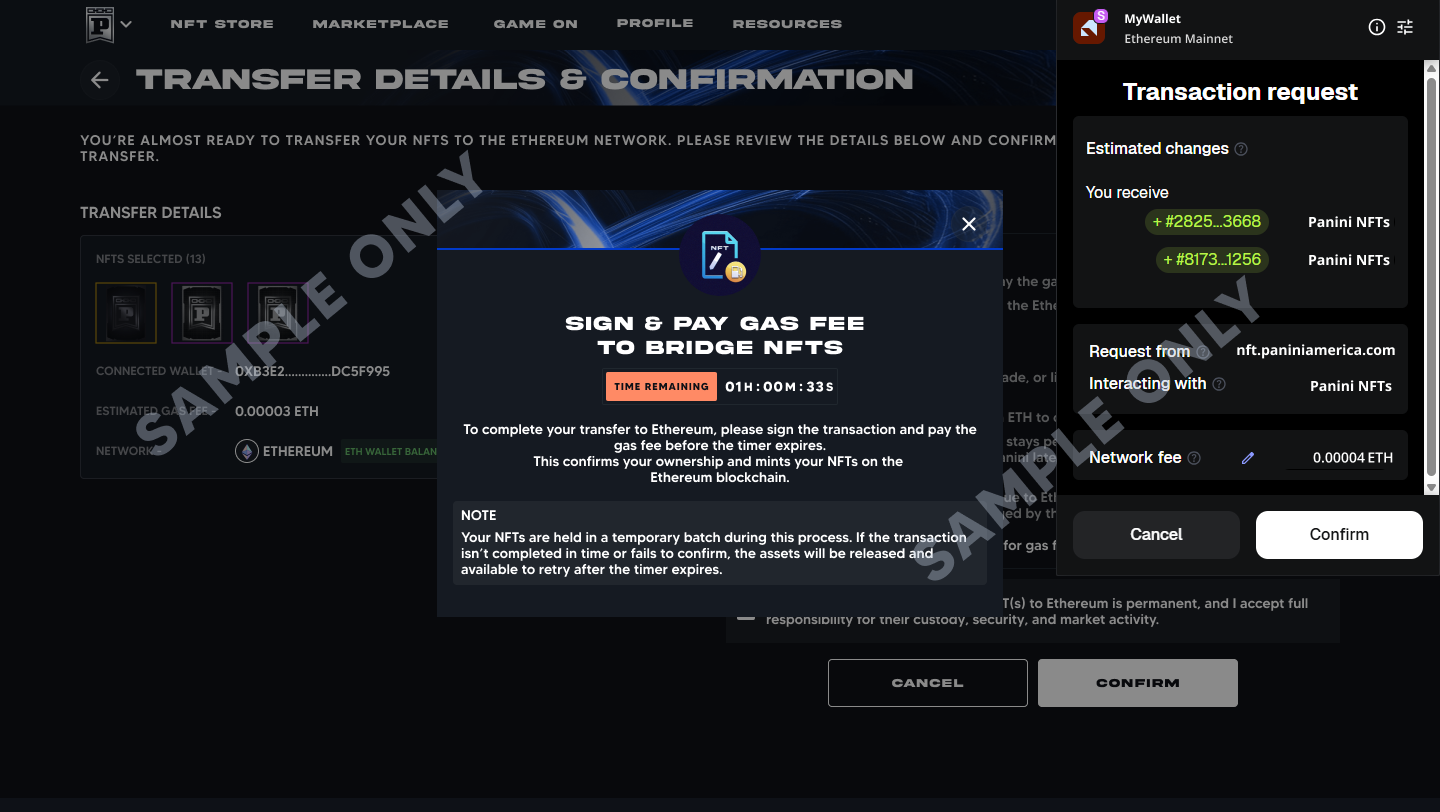
8. Once approved, your NFTs are sent to the Ethereum network. You can track progress under Transfer History.
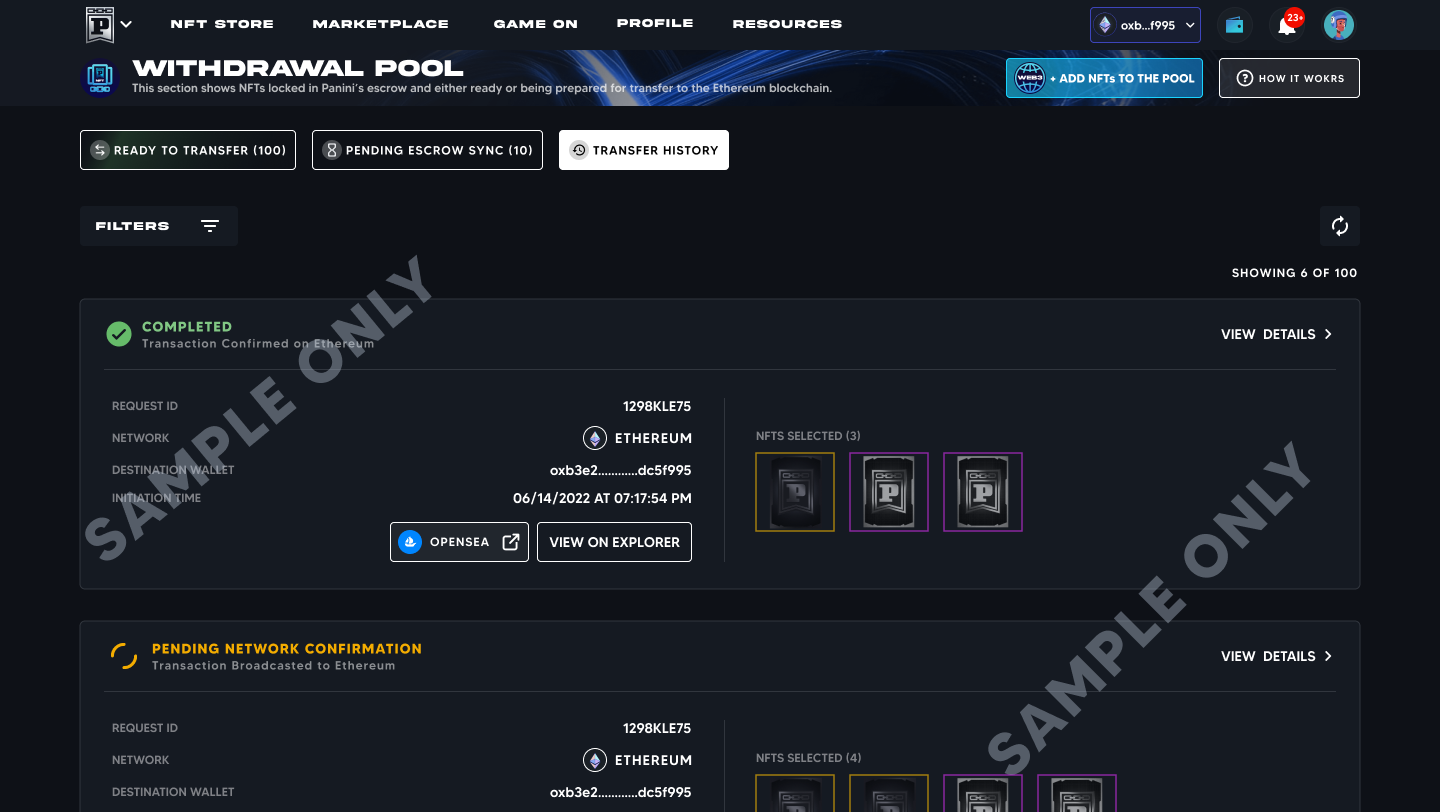
About the OTP (one time password) The OTP is only required once per 1 hour session. After you verify it the first time, you can initiate additional transfers during that session without being prompted again. A new OTP will be required after 1 hour. |
You will be notified when the transfer is complete You will receive an email confirmation once your NFTs have been successfully transferred to Ethereum. |
NFTs may take time to appear on OpenSea After minting, it may take some time for your NFTs to appear on OpenSea. OpenSea needs to index the new data from the blockchain. This is normal and your NFTs will appear automatically once indexing is complete. |
Q What do the statuses in the Withdrawal Pool mean?
The Withdrawal Pool has three tabs: Pending Escrow Sync, Ready to Transfer, and Transfer History. Within the Ready to Transfer tab, individual NFTs can show the following statuses:
Status | What it means |
Processing | Your NFT's ownership is being transferred to Panini Escrow and its metadata is being prepared. This can take up to 2 hours on first transfer. You cannot remove or mint the NFT until this step is complete. |
Ready to Transfer | Your NFT is locked in escrow and ready to be minted on Ethereum. Select it, pay the gas fee, and confirm the transfer. |
Not Mintable | This NFT has been restricted and cannot be transferred to Ethereum. |
Batch Hold | This NFT is part of a group currently awaiting your wallet signature. It cannot be selected, removed, or minted until the batch is resolved or the timer expires. |
Pending Confirmation | The signed transaction has been sent to Ethereum and is awaiting on chain confirmation. This typically takes 2 to 5 minutes. |
Q What do the statuses in Transfer History mean?
Status | What it means |
Pending Network Confirmation | Your transaction has been sent to Ethereum and is awaiting blockchain confirmation. This typically takes 2 to 5 minutes. |
Completed | The transaction is confirmed on Ethereum. Your NFTs are now in your Ethereum wallet and visible on OpenSea. |
Expired | The transaction timed out before the Ethereum network could process it. The NFTs will be returned to Ready to Transfer once the expiry is fully resolved so you can retry. |
Failed | The transaction did not complete on the Ethereum blockchain. Your NFTs are automatically returned to the Ready to Transfer tab. You can retry the transfer. Check that your wallet has enough ETH for gas fees before retrying. |
Q How do I transfer my NFTs back to the Panini Blockchain?
You can deposit your NFTs back from Ethereum to your Panini account at any time. There is no time limit on how long they can stay on Ethereum.
Step 1: Connect your wallet
Make sure the Ethereum wallet that holds your NFTs is connected to your Panini account. Make sure it has enough ETH to cover the gas fee for the return transfer.
Step 2: Navigate to your Ethereum Wallet
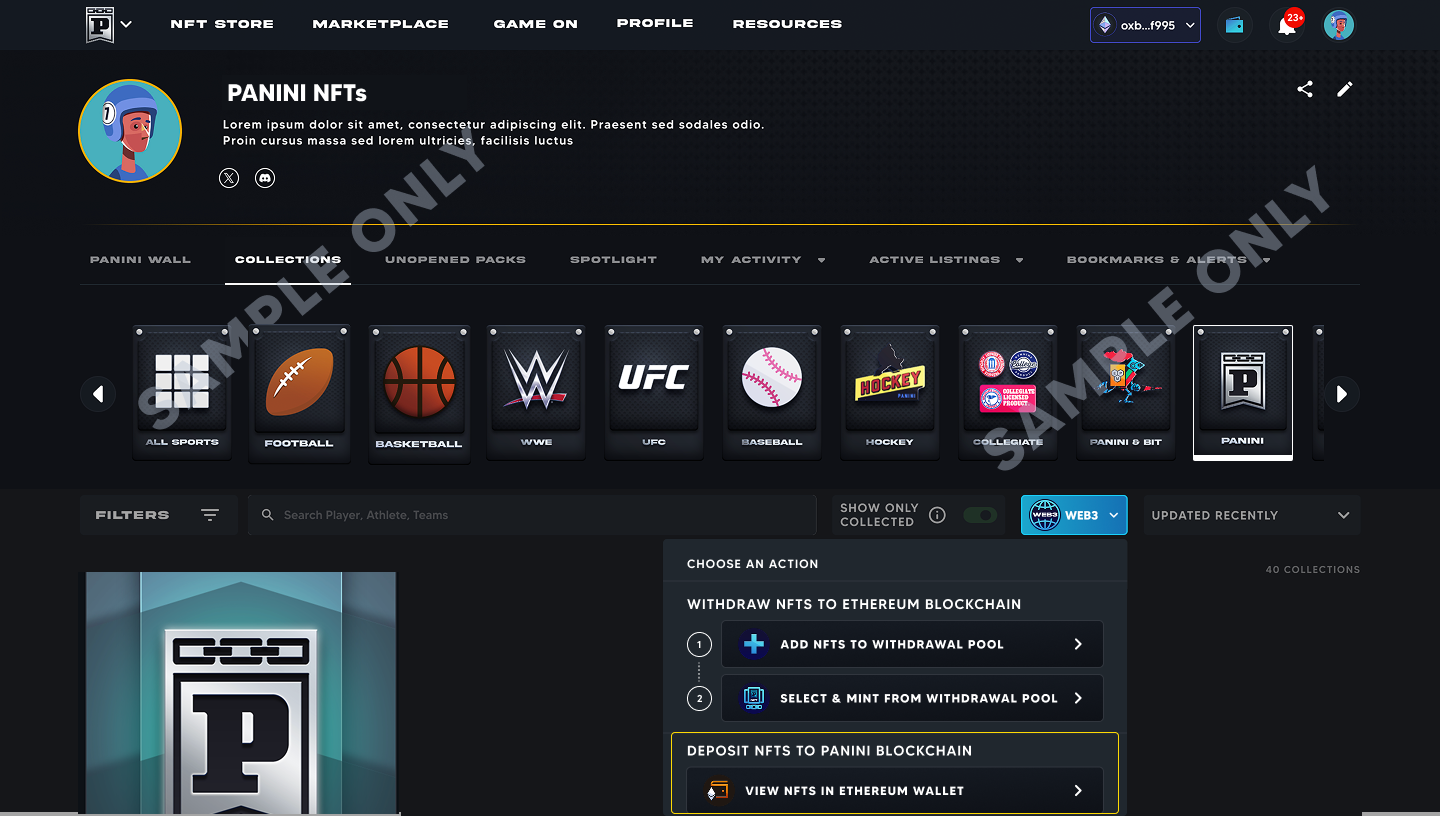
Option A: From Collections.
Go to Profile > Collections > Web3 > Deposit NFTs to Panini Blockchain > View NFTs on Ethereum Wallet.
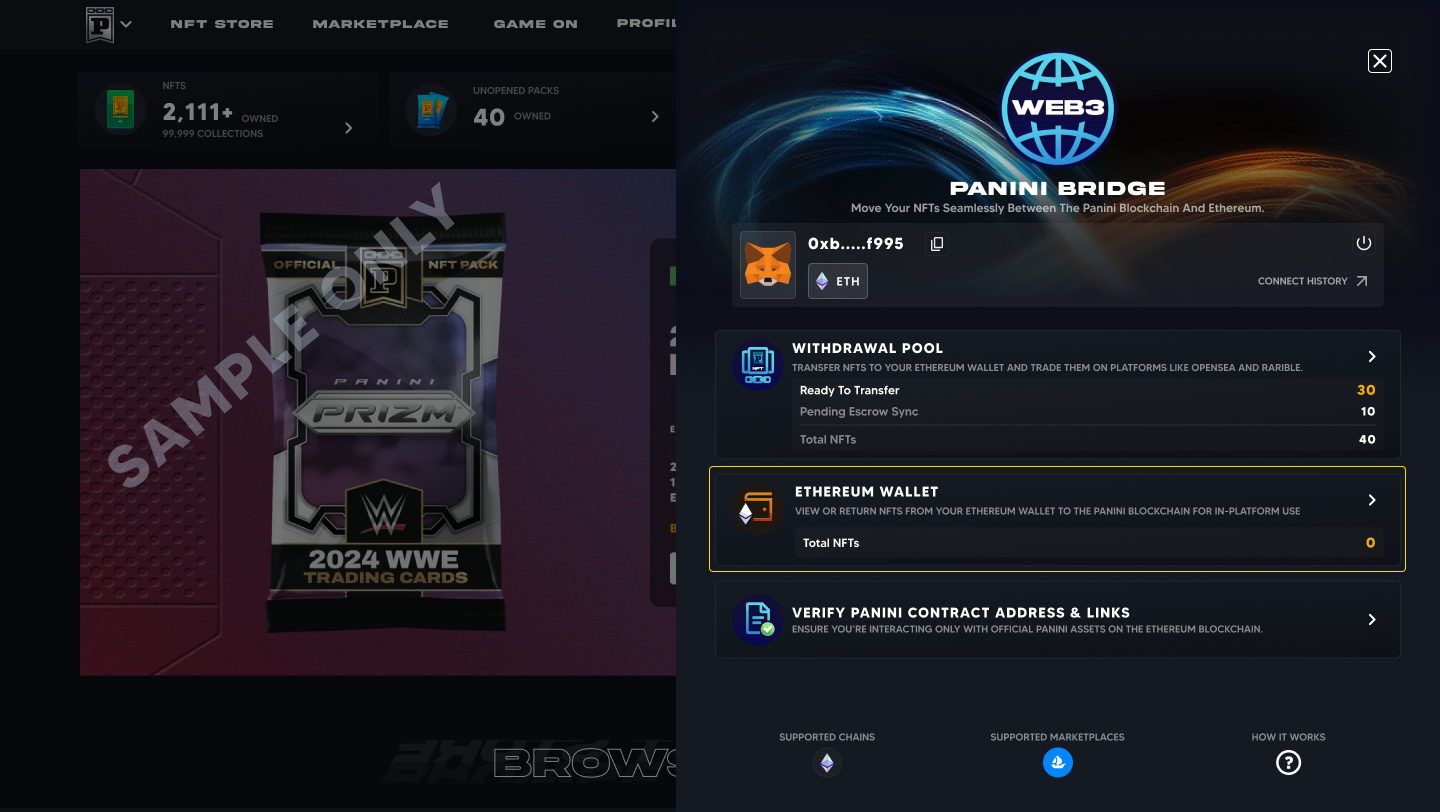
Option B: From Panini Bridge.
Go to Web3 > Ethereum Wallet from the main menu.
Step 3: Select and deposit your NFTs
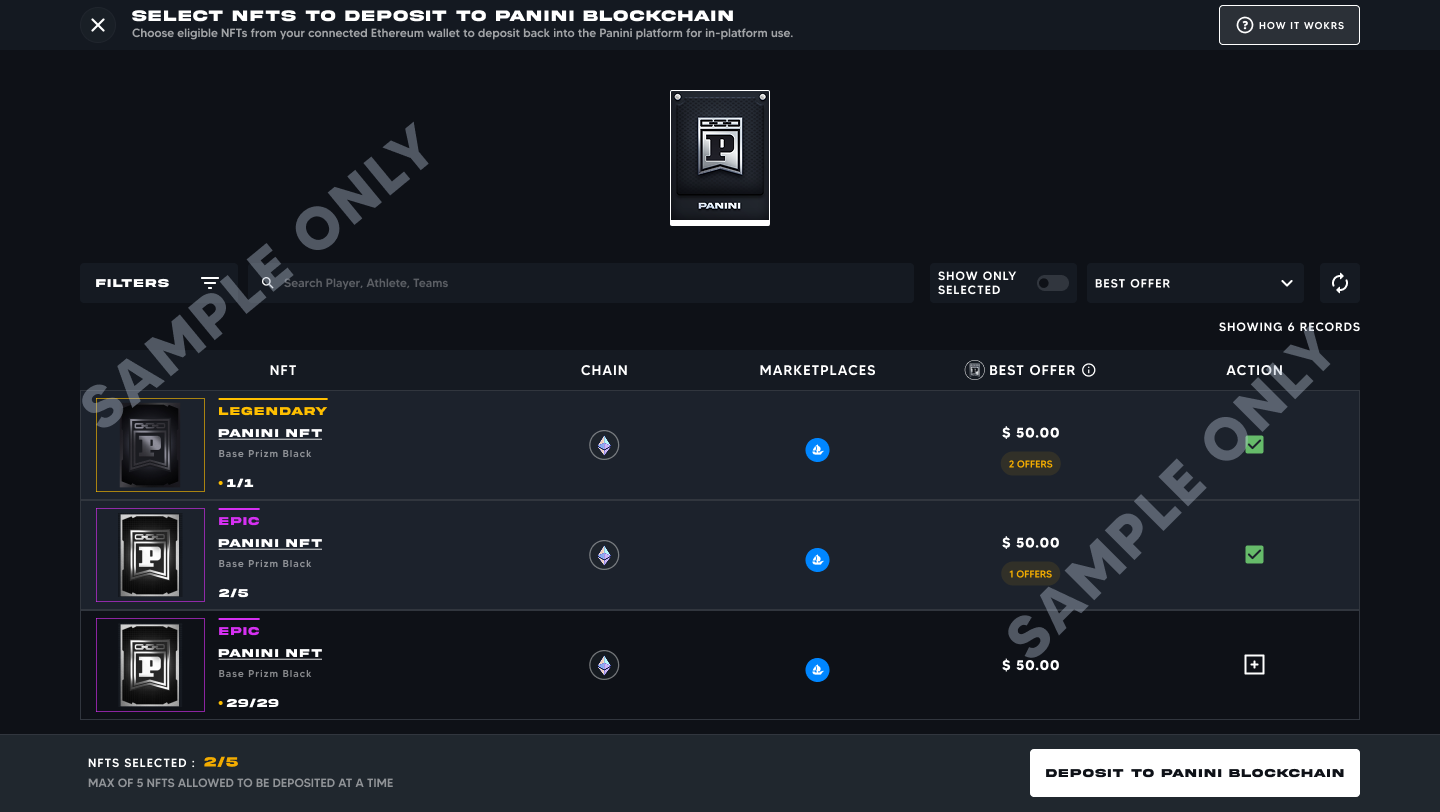
On the Ethereum Wallet page, click Deposit to Panini Blockchain.
Choose up to 5 NFTs and confirm your selection.
Review your wallet address, estimated gas fee, and network details.
Accept the terms and click Confirm.
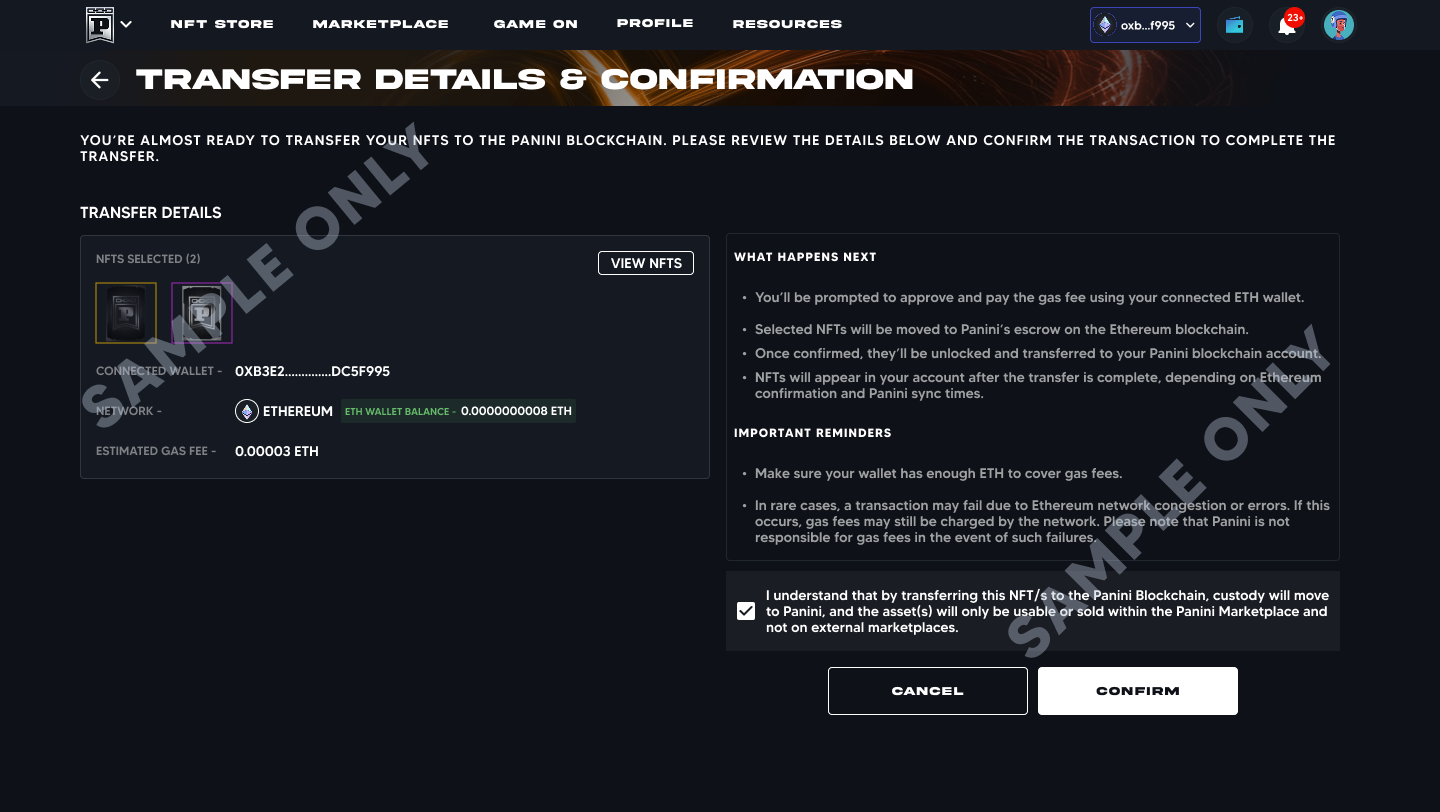
Approve the transaction in your wallet pop up.
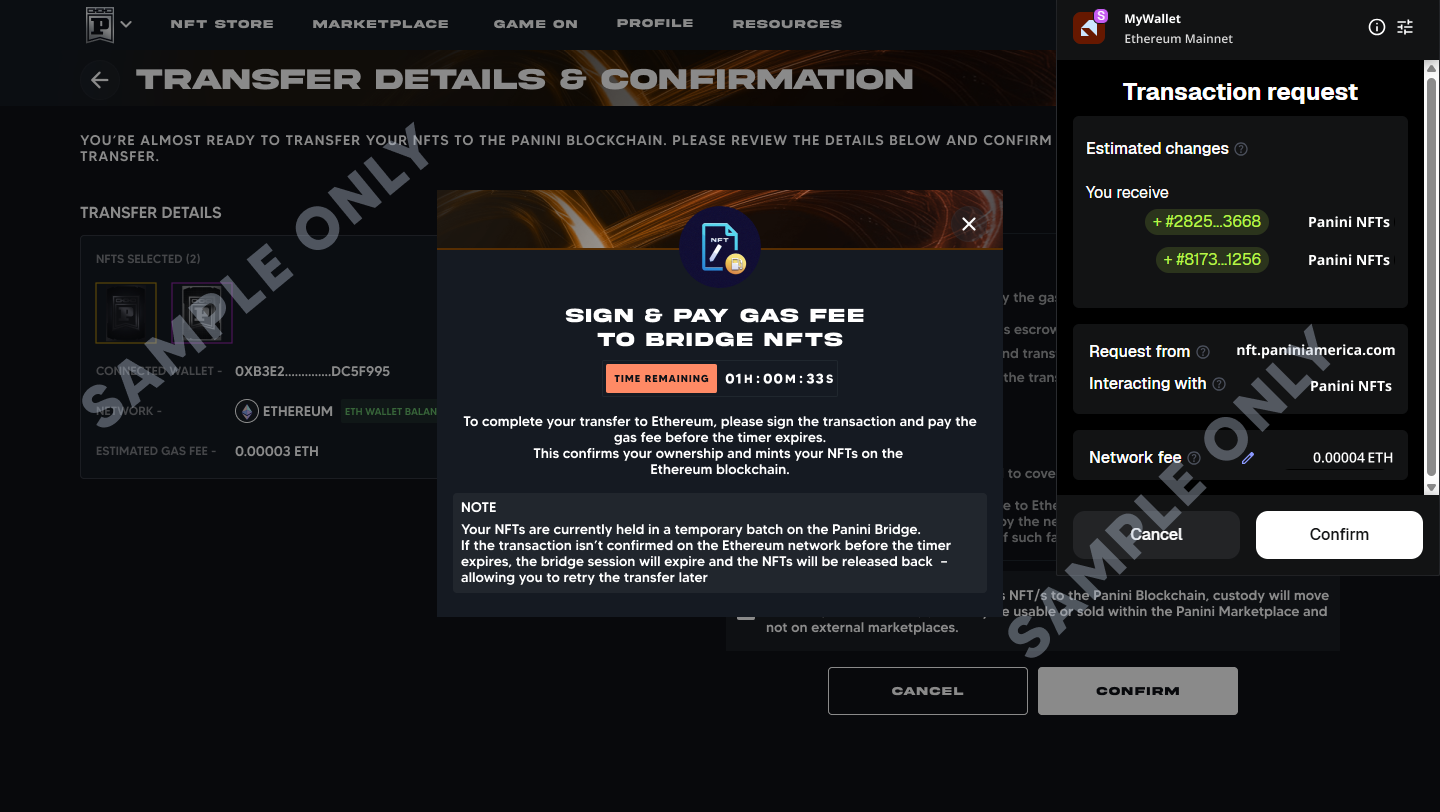
You will be notified when the deposit is complete You will receive an email confirmation and a notification once your NFTs have been successfully returned to your Panini collection. |
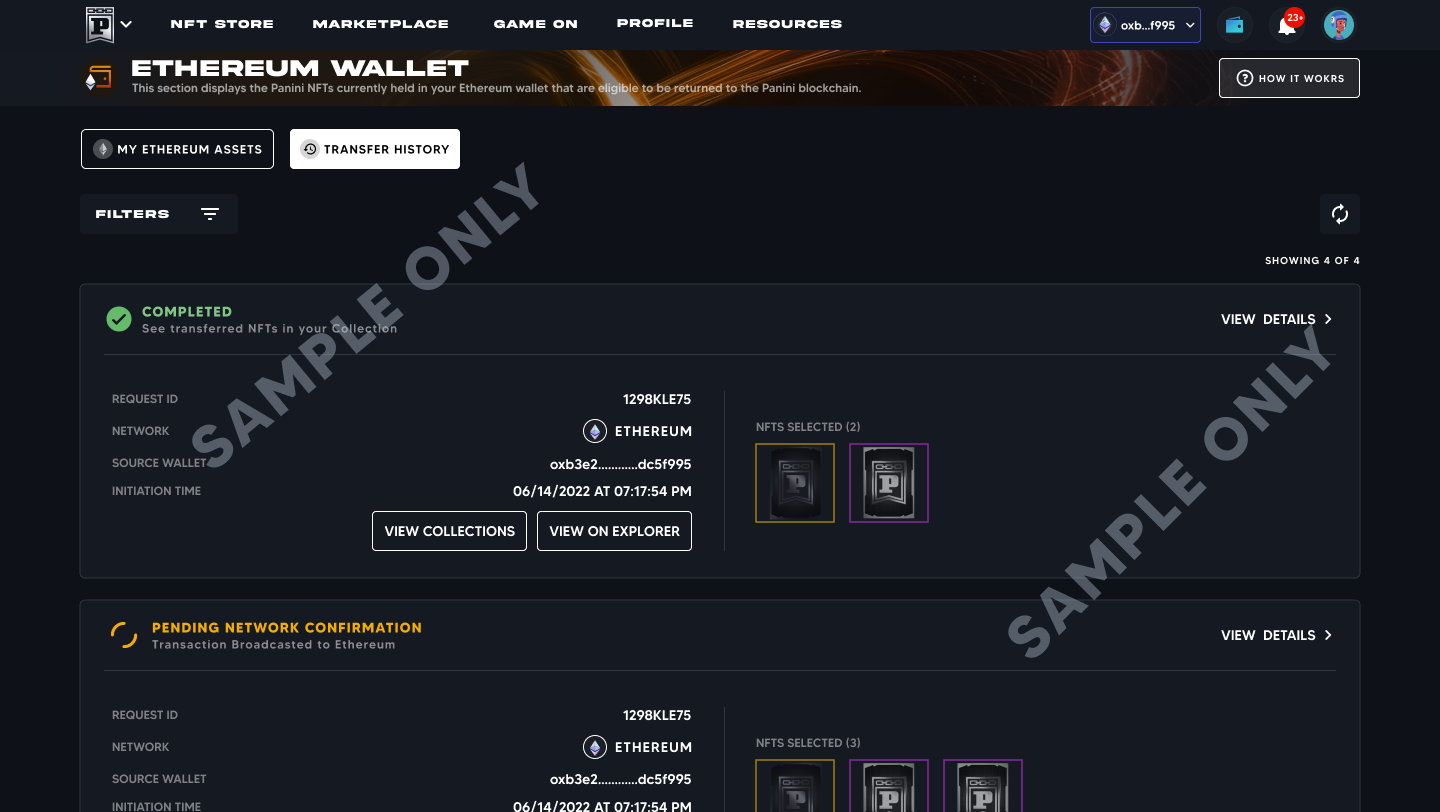
Allow a short sync time After the deposit is confirmed on Ethereum, your NFTs may take a short time to reappear in your Panini collection due to blockchain syncing. They will appear automatically once syncing is complete. |
Q What do the deposit statuses mean?
Status | What it means |
Pending Network Confirmation | Your deposit transaction has been sent to Ethereum and is being confirmed. This typically takes 2 to 5 minutes. |
Completed | The transaction is confirmed. Your NFTs are now back in your Panini collection. |
Expired | The transaction was not confirmed in time. You can retry the deposit. |
Failed | The transaction did not complete. Check your wallet for error messages or insufficient gas fees and retry. |
Q What happens to Challenges, Crafts, and Set Collection if my NFTs are on Ethereum?
NFTs on Ethereum cannot be used in Panini activities Challenges, Crafts, and Set Collection all require your NFTs to be on the Panini Blockchain. If a card you need is currently on Ethereum, you will need to bridge it back to Panini first. |
This is especially important for Set Collection. If you are actively working toward completing a set, make sure all the cards you need are in your Panini collection
To return NFTs to Panini, use the deposit process described in the section above. Once returned, your NFTs will be immediately eligible for Challenges, Crafts, Set Collection, and all other in platform activities.
Q Can I still sell my NFTs on Panini after moving them to Ethereum?
No. Once an NFT is on the Ethereum blockchain, it can only be sold on external marketplaces such as OpenSea. It is not accessible through the Panini Marketplace until it is deposited back to your Panini collection.
To list or sell on Panini again: bridge the NFT back using the deposit process, and it will become active in your Panini collection.
Q How can I accept an offer if my NFT is on Ethereum?
If your NFT is on Ethereum and you receive an offer on the Panini Marketplace, you will need to bridge it back to the Panini Blockchain before you can accept it. All offers and trades on the Panini Marketplace are processed exclusively within the Panini ecosystem.
Once the NFT is returned to your Panini collection, you can accept offers, list it for sale, or trade it as normal.
Q Can I place offers on NFTs that are on Ethereum?
Yes, in two ways:
On OpenSea: Visit OpenSea and place an offer directly on the listed NFT. This requires a connected Web3 wallet and is handled on the Ethereum blockchain.
On the Panini site: You can also place offers on Panini as you normally would. These offers are recorded on the Panini Blockchain. If the seller wants to accept, they can bridge the NFT back and complete the sale through Panini.
Q Are gas fees required for both directions of transfer?
Yes. Both directions involve a transaction on the Ethereum blockchain and require a gas fee:
Transferring to Ethereum (minting): Gas fee required.
Depositing back to Panini: A small gas fee is also required, as it initiates a blockchain transaction.
Gas fees fluctuate based on how busy the Ethereum network is at the time of your transaction. You can check current gas prices on etherscan.io before initiating a transfer.
Q Why don't my NFTs appear on OpenSea immediately after minting?
After minting, OpenSea needs to index your NFTs. This means scanning the blockchain for new tokens and loading all the metadata (card image, details, etc.). This process can take from a few minutes to a few hours depending on network activity. This is completely normal. Your NFTs will appear automatically once indexing is complete.
Q What is Panini Escrow and why is it used?
Panini Escrow is a secure, system controlled holding account that holds your NFTs during the transfer process. It serves two important purposes:
It prevents duplication. Your NFT is locked on Panini before it appears on Ethereum, so there is never two copies in existence at the same time.
It maintains authenticity. Every NFT passing through Panini Bridge is verified before and after transfer.
While in escrow, your NFT shows as Locked and ownership displays as Panini Escrow. Once the transfer is complete, ownership fully moves to your Ethereum wallet.
Q What is metadata, and why does preparing it take so long?
Metadata is all the descriptive information attached to your NFT: the card image, player name, card type, serial number, rarity, and other details that make each card uniquely identifiable and verifiable on the public blockchain.
When your NFT is first prepared for transfer, Panini must upload this metadata, including the full card artwork, to Arweave, a permanent decentralized storage network. Once stored on Arweave, this information is preserved forever and cannot be changed or deleted by anyone.
Why it can take up to 2 hours (first time only) First time bridge: When an NFT is bridged to Ethereum for the first time, Panini prepares and uploads its metadata to Arweave. This can take up to 2 hours. Second time and beyond: If you bridge an NFT back to Panini and later send it to Ethereum again, the metadata is already stored. This step is skipped and processing is much faster. The 2 hour window is an estimate. In most cases it will be faster, but prepare for up to 2 hours during busy periods. |
Q Can I start multiple transfers at the same time?
Yes. You can add NFTs to the Withdrawal Pool and initiate multiple transfers simultaneously. Keep in mind the following limits apply per transaction, not across all transfers combined:
Withdrawal Pool: Maximum 15 NFTs per sport in the pool at any given time.
Per transfer transaction: Maximum 5 NFTs per transaction to Ethereum.
Deposit (return to Panini): Maximum 5 NFTs per transaction.
Q Where are my NFTs and their metadata stored?
Your NFTs are stored in two places depending on where they are in the transfer process:
On the Panini Blockchain: Both the NFT and its metadata are managed by Panini securely on the platform.
On the Ethereum Blockchain: A matching token is minted on Ethereum, and the metadata and artwork are permanently stored on Arweave. Files on Arweave are permanent and publicly accessible, meaning your NFT's details are always verifiable even outside of Panini.
Q Are all transactions tracked?
Yes. Every transfer is recorded for full transparency:
Ethereum transactions: Permanently recorded and publicly viewable on Etherscan (etherscan.io).
Panini transactions: Visible in the Provenance section of each NFT on the Panini site. Note: Panini Blockchain transactions do not appear on Etherscan.
Panini displays transactions using collector nicknames. Ethereum transactions use wallet addresses. Together, these give a full, verifiable ownership trail across both blockchains.
Q How do I verify that a Panini NFT on Ethereum is genuine?
Go to Web3 > Panini Bridge > Verify Panini Contract Addresses,
Open Sea Links & Etherscan links on the Panini website. The system will check whether it belongs to an official Panini collection.
If genuine: You will see a confirmation that it is an official Panini NFT.
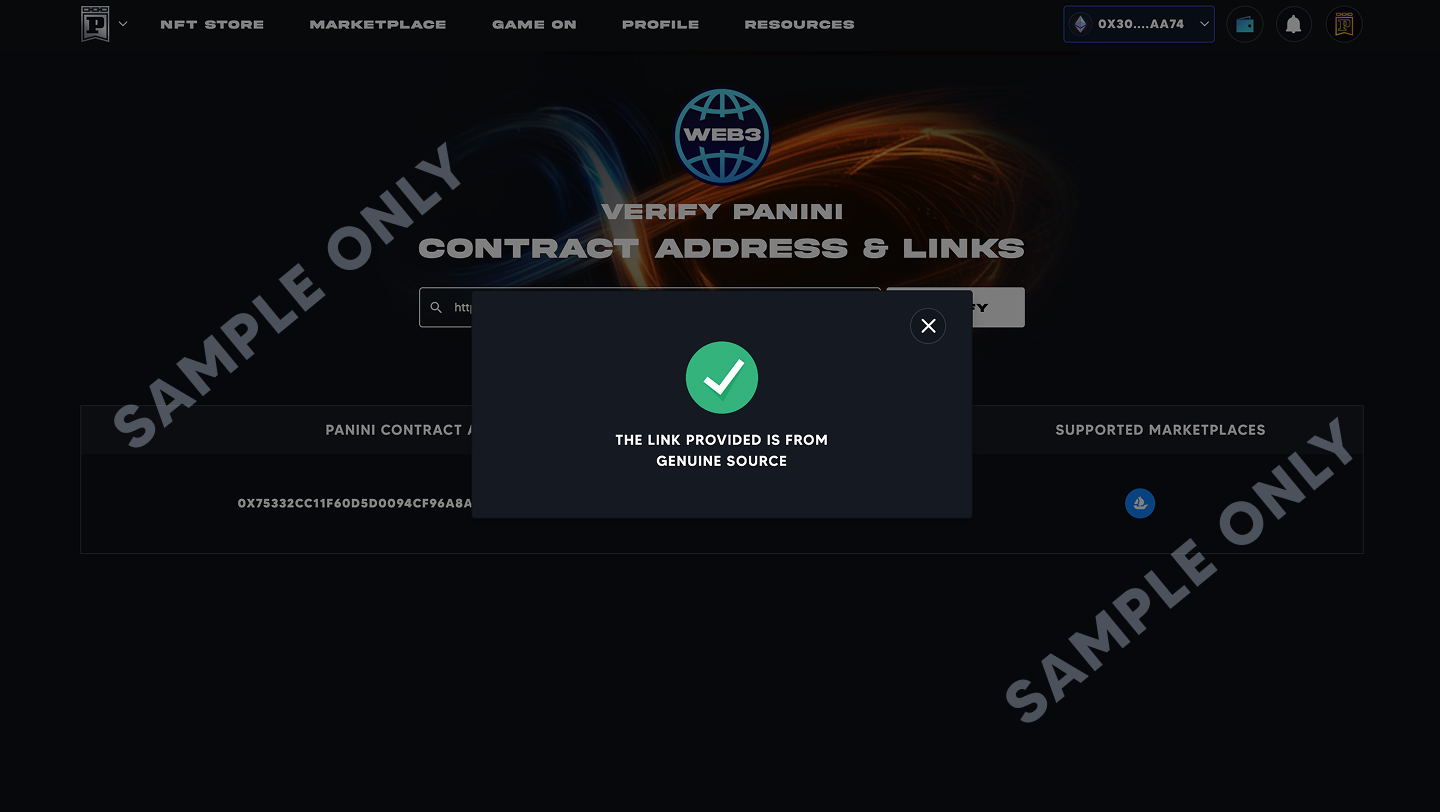
If not genuine: You will see a warning. Do not purchase or trade an NFT that fails this check.
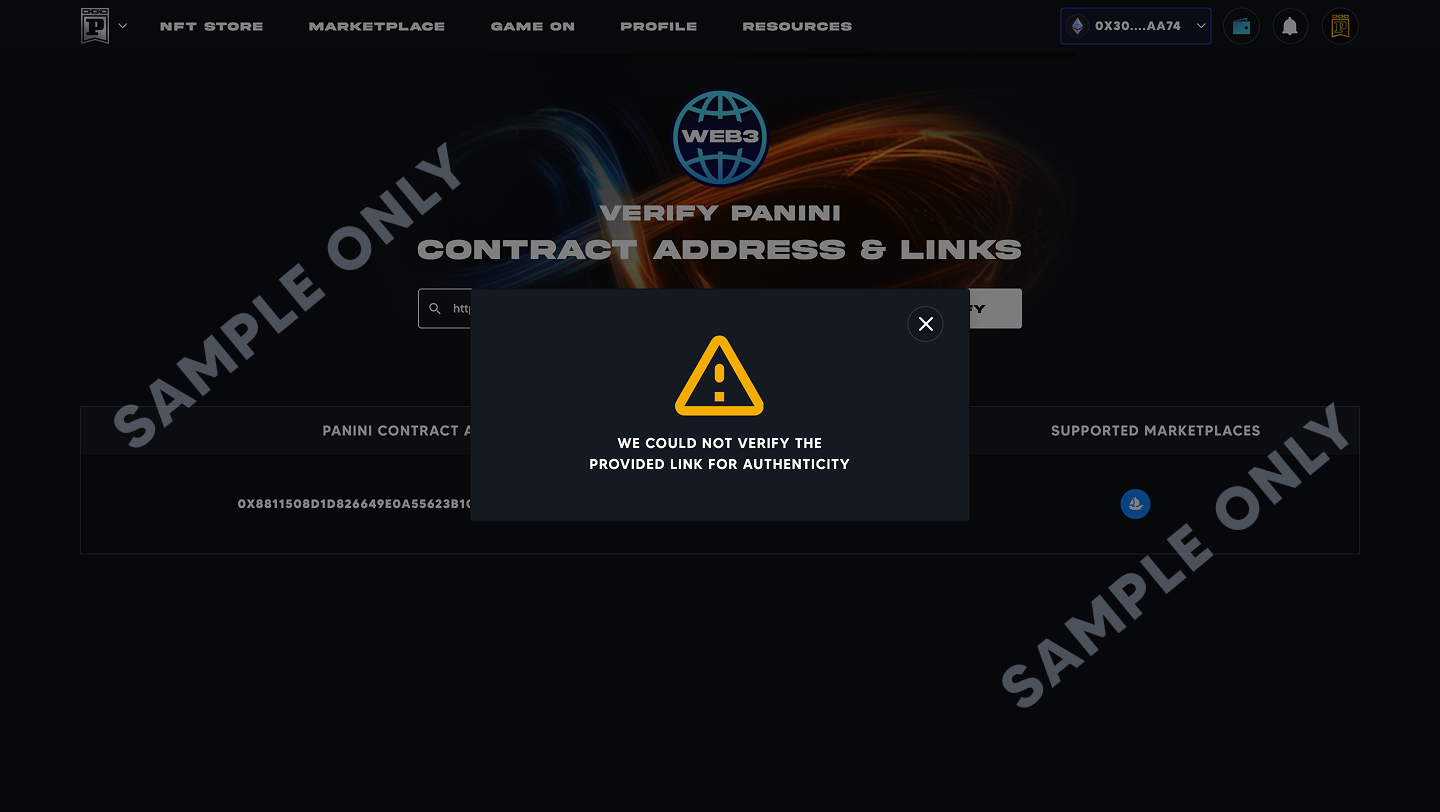
Currently supported verification sources: OpenSea links and Etherscan links only.
Q How do I import my NFTs to MetaMask?
Option A: Enable auto detection (recommended)
Open MetaMask > Settings > Security and Privacy.
Turn on Autodetect NFTs.
Your NFTs will appear automatically in the NFTs tab once detected.
Option B: Add manually
You will need the Contract Address and Token ID for your NFT. Both can be found on OpenSea or Etherscan.
Open MetaMask > NFTs tab.
Tap Import NFTs.
Enter the Contract Address and Token ID.
Tap Import.
For full details, visit: https://support.metamask.io/manage-crypto/nfts/nft-tokens-in-your-metamask-wallet/
Item | Detail |
Supported marketplace | OpenSea (Exclusive Launch Partner) |
Supported wallets | MetaMask, Coinbase Wallet, Connections through WalletConnect (over 100+ wallets) |
Withdrawal Pool limit | 15 NFTs per sport maximum |
Transfer to Ethereum per transaction | 5 NFTs maximum |
Deposit back to Panini per transaction | 5 NFTs maximum |
Metadata prep time (first bridge) | Up to 2 hours (first time only) |
Metadata prep time (subsequent bridges) | Significantly faster: already stored on Arweave |
Gas fees: to Ethereum | Required (paid in ETH, varies with network activity) |
Gas fees: back to Panini | Required (small fee, varies with network activity) |
Ethereum confirmation time | Typically 2 to 5 minutes |
Mobile app transfers | Not available: web browser only |
Metadata storage | Arweave (permanent and decentralized) |
OTP verification | Required once per 1 hour session (not on every transaction) |
Contact Customer Support
What's Available at Launch?
This section answers the most common questions about what is supported right now. As Panini Bridge grows, additional collections, wallets, and marketplaces will be added. Check back for updates.
Q Which NFT collections can be bridged to Ethereum?
At launch, the following Panini NFT collections are available for transfer through Panini Bridge:
Bad Egg Collections
2025 Panini NFT Prizm Bad Eggs
2025 Panini NFT Prizm Bad Eggs: Introducing The Clans
More collections coming Select Panini NFT collections will be made available for bridging over time. |
Q Which public marketplaces are supported?
Panini has partnered exclusively with OpenSea as the official marketplace for Panini NFTs. Once your NFTs are transferred to the Ethereum blockchain, you can list, sell, and showcase them directly on OpenSea.
OpenSea: Panini's Exclusive Marketplace Partner OpenSea is the world's largest NFT marketplace and Panini's official launch partner. Only trade or purchase Panini NFTs through OpenSea to ensure you are transacting on a verified, Panini approved platform. |
Q Which wallets are supported?
The following wallet options are supported at launch:
MetaMask: one of the most widely used Ethereum wallets. Available as a browser extension and mobile app.
Coinbase Wallet: the self custody wallet from Coinbase, available on web and mobile.
Connections throughWalletConnect: WalletConnect is a connector protocol (not a wallet itself) that supports over 100+ different wallet types. If your preferred wallet is not MetaMask or Coinbase Wallet, check if it is compatible through WalletConnect.
Not sure which wallet to use? If you are new to Web3, MetaMask is the most commonly-used starting point and has detailed setup guides available at Setup Guide |
Q Which blockchains are supported?
Panini Bridge supports transfers to and from the Ethereum blockchain only. Ethereum is the world's most widely used public blockchain and is the standard for NFT transacting on platforms like OpenSea.
Q Where is my NFT's metadata stored once it is bridged?
When your NFT is transferred to Ethereum, its metadata and artwork are permanently stored on Arweave: a decentralized, permanent storage network. This means your NFT's image and details can never be lost, altered, or deleted by anyone, including Panini.
While your NFT remains on the Panini Blockchain, its metadata is managed securely by Panini on their platform.
Panini's custom view on OpenSea |
Q Can I use Panini Bridge on the mobile app?
No. The Panini Direct mobile app is view only for Panini Bridge.
You can view your NFTs and collections in the app.
You cannot initiate transfers, connect wallets, or manage the Withdrawal Pool from the mobile app.
Use a web browser for all transfers All wallet connections and NFT transfers must be done through a web browser at nft.paniniamerica.net. A desktop browser is recommended for the best experience. |
Default Payment Settings
Bridging NFTS to Ethereum Blockchain